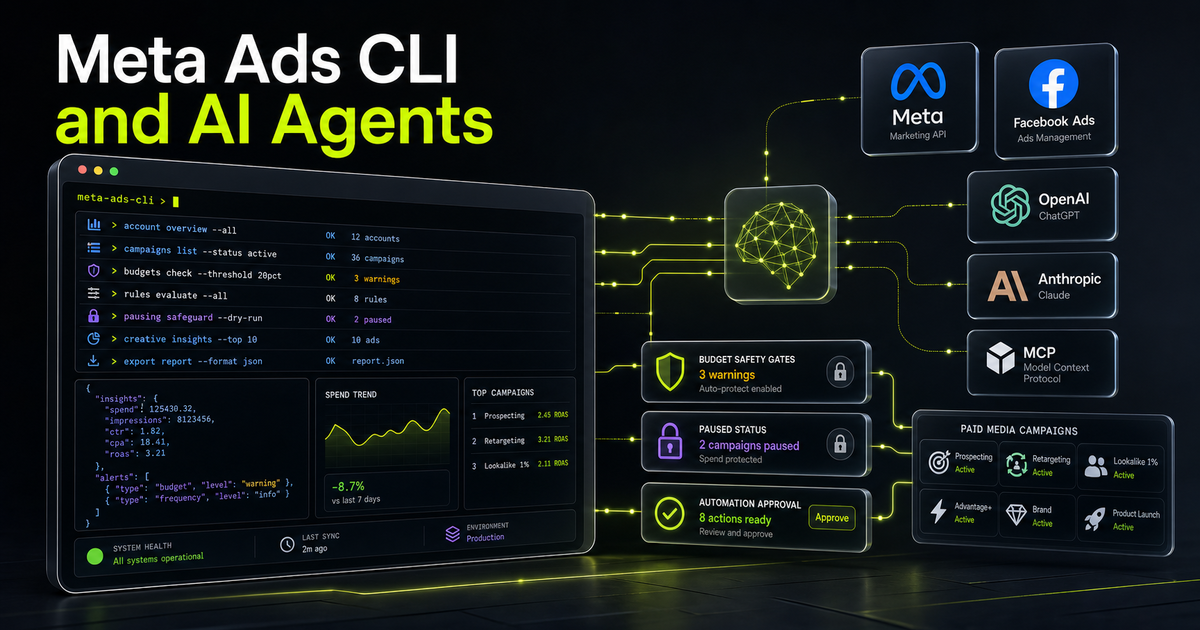
Meta Ads CLI and AI Agents: How Developers Can Automate Campaigns Safely in 2026
Meta Ads CLI gives developers and AI agents a safer, scriptable way to work with Meta campaigns, insights, catalogs, and datasets. The opportunity is real, but only if teams add approval gates, spend controls, and audit logs before agents touch live campaigns.

When Meta gives developers a command line interface for advertising, the real story is not the terminal. The real story is control.
Meta introduced Ads CLI on April 29, 2026 as a command-line interface for Meta Ads and Commerce. On paper, it is a developer productivity tool. It lets teams create campaigns, update ad sets, pull insights, manage catalogs, work with datasets, and handle product-related operations without writing the same Marketing API boilerplate again and again. That is useful on its own.
But the bigger shift is that Meta describes the CLI as a tool that developers and AI agents can use. That single phrase changes the discussion. A command-line tool is predictable, scriptable, observable, and easy to wrap with policy. An AI agent can call it, parse JSON output, propose changes, and hand a marketer or revenue leader a clear approval step before spend is touched.
That is why Meta Ads CLI deserves attention from business teams, not only developers. Paid media is one of the areas where automation can create value quickly, but it is also one of the areas where bad automation can create waste quickly. A campaign bot that moves budget without approval is not innovation. It is operational risk with a friendly interface.
For Optijara clients in Dubai, Abu Dhabi, Riyadh, London, and remote growth teams, this is the useful frame: Meta Ads CLI is not a reason to let agents buy ads autonomously. It is a reason to build a safer operating layer around Meta advertising workflows.
What Meta Ads CLI is
Meta Ads CLI is a command-line wrapper around Meta advertising and commerce workflows. Instead of writing custom scripts for authentication, pagination, output formatting, error handling, campaign operations, and reporting, a developer can use predictable commands from the terminal.
Meta's own announcement positions it as a tool for developers and AI agents working with the Meta Marketing API. That matters because the Marketing API has always been powerful, but it has also required engineering effort. Teams had to build and maintain internal scripts just to answer routine questions such as: which campaigns are active, what did spend look like last week, which ad sets are underperforming, and which product sets need attention?
A CLI lowers that barrier. It gives developers a common interface. It gives data teams a clean way to pipe results into analysis tools. It gives platform teams a more controlled surface for automation. And it gives AI agents a tool that is easier to constrain than a browser session clicking through Ads Manager.
The difference between a browser workflow and a CLI workflow is important. Browser automation is fragile. Buttons move, modals interrupt, sessions expire, and the agent often has too much freedom. A CLI command can be allow-listed, logged, tested, and wrapped in approval logic. That is a better foundation for enterprise automation.
This is similar to the broader shift we see in agentic AI revenue operations: the useful systems are not magic assistants. They are controlled workflows where agents can gather data, prepare actions, and escalate decisions with context.
Why the timing matters
Meta launched Ads CLI at a moment when teams are already trying to connect AI agents to operational systems. Developers are using Claude Code, Codex, Cursor, and other coding agents to generate scripts, inspect APIs, and automate repetitive work. Marketing teams are using ChatGPT and Claude to draft briefs, summarize performance, and create experiments. The missing layer has been a reliable bridge into the actual ad platform.
Meta Ads CLI gives technical teams a first-party bridge. That does not mean every marketer will open a terminal. Most will not. The terminal matters because it gives the organization a deterministic interface that can sit behind a more friendly workflow.
For example, a marketing manager might ask an internal assistant: "Show me campaigns where spend rose more than 20 percent but conversions did not improve." The assistant does not need direct uncontrolled access to Ads Manager. It can call a read-only wrapper around Meta Ads CLI, retrieve insights as JSON, and return a summary with links and evidence.
Later, the same assistant might propose a paused campaign structure for a seasonal promotion. The CLI can create the draft assets in PAUSED status. A human reviews budget, targeting, copy, creative, and compliance. Only after approval does a separate activation workflow run.
That is the right pattern. AI prepares and explains. Humans approve spend and brand exposure.
What developers and agents can do with it
Meta's announcement highlights several practical areas: campaign management, performance insights, catalog operations, and datasets. Those map directly to common business workflows.
Campaign management is the obvious starting point. Teams can create, list, update, and delete campaigns, ad sets, ads, and creatives without leaving the terminal. That does not mean the first use case should be fully automated campaign launch. A better first use case is campaign scaffolding. The agent prepares a campaign structure, naming convention, objective, draft ad set, draft creative metadata, and checklist. The resources stay paused until a person approves them.
Performance insights are usually safer and often more valuable at first. The CLI can query spend, impressions, CTR, conversions, ROAS, and other metrics with date ranges and breakdowns. This is ideal for reporting agents. A revenue team can ask for anomalies, underperforming campaigns, or weekly trend summaries. Because output can be JSON or tab-separated values, the results can feed dashboards, spreadsheets, data pipelines, or simple review messages.
Catalog and commerce workflows are also important. E-commerce teams often struggle with product data quality, product sets, feed issues, and campaign/catalog alignment. CLI-driven checks can identify missing images, broken URLs, inconsistent pricing, or product sets that do not match campaign structure. An agent can prepare a remediation list rather than waiting for a manual Ads Manager review.
Datasets and conversion tracking are another area where controlled automation helps. Conversion pixels and dataset connections are often set once, forgotten, and later blamed when performance data becomes unreliable. A CLI workflow can verify that datasets are connected to the right accounts and catalogs, then alert a team before reporting breaks.
The pattern across all of these use cases is simple: let the agent collect, check, draft, and explain. Be careful with anything that activates spend.
The safety feature people should not ignore
The most important phrase in Meta's launch is that resources are created in PAUSED status by default. That is not a small implementation detail. It is the feature that makes agent workflows more realistic.
If an AI agent can create a campaign, the safest default is that the campaign does not go live. A paused resource lets the organization separate creation from activation. The agent can do the repetitive setup work. The human can make the business decision.
This should become a standard control in any paid-media agent architecture. There should be different permissions for reading insights, drafting campaigns, changing budgets, changing targeting, and activating campaigns. Most agents should start with read-only access. A smaller number should be able to create paused drafts. Activation should require explicit approval, preferably with a logged human identity and a clear diff of what will change.
Budget controls matter too. A safe workflow should cap daily budget changes, require approval for new spend, and block commands that exceed policy. If a user asks an agent to launch a campaign with an unusually high budget, the agent should not negotiate with itself. It should stop and escalate.
Creative and compliance gates matter as well. In regulated industries or sensitive markets, ad copy and landing pages need review. In the UAE and wider MENA region, teams often operate across languages, jurisdictions, and cultural contexts. A command that creates an ad should not bypass brand and legal checks just because the CLI makes it technically easy.
This is the same lesson behind enterprise-grade Model Context Protocol implementations: tool access is not enough. The wrapper around the tool is where governance lives.
Meta Ads CLI vs Meta Ads MCP and AI connectors
Meta Ads CLI is not the only path into ad automation. Around the same launch window, coverage also discussed Meta's AI connectors and MCP-style access paths for tools such as Claude and ChatGPT. These approaches are related, but they serve different needs.
A CLI is deterministic. It works well when developers want exact commands, repeatable output, version-controlled scripts, CI/CD jobs, and logs. It is easier to test. It is easier to restrict. It is easier to run in a controlled backend service.
An MCP or natural-language connector is more conversational. It can be useful when a marketer wants to ask questions in plain English or when an assistant needs structured access to platform capabilities. The risk is that natural language can hide operational detail. A user may say "improve this campaign" without specifying budget boundaries, targeting rules, or approval requirements.
The best enterprise design may use both. Use MCP-style interfaces for user interaction and discovery. Use the CLI behind the scenes for deterministic execution. The assistant can translate a user's request into a proposed set of CLI commands, show the plan, validate it against policy, and then execute only the approved parts.
That design also gives teams an audit trail. Instead of storing vague assistant messages, the system logs the exact command, input, output, approver, timestamp, and result.
For leaders comparing this to coding tools such as Cursor, Windsurf, and Claude Code, the same principle applies. The strongest agents are not the ones with the most freedom. They are the ones with the best tools, context, tests, and guardrails.
A practical enterprise architecture
A safe Meta Ads CLI agent should not be a single prompt with account access. It should be a small system with clear layers.
The first layer is identity and permissions. Separate read-only reporting from write-capable campaign operations. Use dedicated service accounts where possible. Keep access scoped to the accounts and functions required. Do not let a general assistant inherit a human administrator's full advertising permissions.
The second layer is command allow-listing. The agent should not be able to run arbitrary shell commands. It should call a controlled wrapper that exposes approved Meta Ads CLI actions. For example: list campaigns, get insights, create paused campaign draft, create paused ad set draft, inspect catalog, check dataset connection. Activation commands should be disabled by default or routed through a separate approval service.
The third layer is validation. Before a command runs, validate budget, objective, targeting, status, naming convention, account ID, currency assumptions, landing page domain, and required campaign metadata. After a command runs, parse the JSON output and verify the expected state. If the command fails, report the exact error. Do not invent success.
The fourth layer is approval. For any write action, especially activation or budget change, the system should show a human-readable diff. What will be created? What will change? What account is affected? What is the budget? What is the status? What campaign objective is used? Who requested it? Who approved it?
The fifth layer is logging and monitoring. Every command should produce an audit record. That record should include the agent identity, human requester, account, command type, parameters, output summary, and approval reference. This is not bureaucracy. It is what lets teams trust automation when money and brand reputation are involved.
The sixth layer is rollback and incident handling. If an agent makes a bad draft, deletion is easy. If an agent activates a campaign incorrectly, the team needs a fast pause path, notification path, and post-incident review.
This is where Optijara usually starts with clients: we do not first ask "which model is smartest?" We ask which actions need controls, which data sources are reliable, and where a human must stay in the loop.
Use cases worth piloting first
The safest first use case is read-only reporting. Let an agent pull last week's campaign metrics, compare them with the previous period, identify outliers, and produce a concise performance memo. This can save hours without touching spend.
The second use case is anomaly detection. The agent can look for campaigns where spend increased but conversions did not, ad sets with unusually high CPC, creative fatigue signals, or catalog products with poor delivery. The output should be a recommendation list, not an automatic change list.
The third use case is paused campaign scaffolding. A growth team gives the agent a brief: audience, offer, landing page, geography, budget range, and creative assets. The agent creates paused draft structures and a review packet. A human checks everything before activation.
The fourth use case is catalog hygiene. For commerce teams, product feed issues can quietly damage performance. A CLI-backed agent can check products, product sets, image URLs, pricing fields, and catalog connections, then create a prioritized cleanup queue.
The fifth use case is weekly experiment tracking. The agent can record which campaigns were changed, what hypothesis was tested, what metric moved, and what should happen next. Over time, this creates a stronger operating memory than scattered Slack messages.
These pilots are practical because they produce visible value while keeping risk contained. They also teach the team how much trust the agent deserves.
What business leaders should watch
Meta Ads CLI will tempt some teams to jump directly into autonomous campaign management. That is the wrong first move.
The right question is not "can an AI agent manage Meta ads?" The right question is "which parts of Meta ad operations should become tool-assisted, which should remain human-approved, and which should never be automated without policy?"
Reading insights is low risk. Drafting paused campaigns is medium risk. Changing budgets, targeting, and activation status is high risk. Giving a general-purpose agent full account access is unacceptable for most organizations.
Leaders should also watch data quality. If conversion tracking is broken, the agent will confidently optimize against bad signals. If naming conventions are inconsistent, reporting will be messy. If campaign objectives are unclear, automation will accelerate confusion.
The teams that benefit most from Meta Ads CLI will be the teams that already treat paid media as an operating system: clean data, clear approvals, consistent naming, documented experiments, and accountable ownership.
How Optijara would implement it
For a first Optijara pilot, I would avoid campaign activation entirely. Start with reporting and audit workflows.
Phase one: connect the CLI in a controlled environment and expose read-only insight commands. Build weekly reports for spend, impressions, CTR, conversions, CPA, and ROAS. Add anomaly detection and evidence links.
Phase two: add catalog and dataset checks. Identify missing product fields, broken URLs, disconnected tracking, and mismatched product sets. This is valuable for e-commerce teams and does not require an agent to make risky changes.
Phase three: allow paused campaign scaffolding. The agent creates drafts only. It also produces a review packet with budget, targeting, creative, landing page, objective, assumptions, and risks.
Phase four: add approval-based activation for narrow scenarios. Activation requires a named human approver, policy validation, spend caps, and a rollback plan.
That sequence gives the business value quickly while building trust gradually. It also keeps the agent from becoming a hidden ad buyer.
The bottom line
Meta Ads CLI is more than a developer convenience. It is a sign that ad platforms are becoming more agent-readable and agent-operable. The opportunity is real: faster reporting, cleaner operations, safer campaign scaffolding, and better links between engineering and marketing.
The risk is also real. A tool that can create and update campaigns must be wrapped with approval gates, spend controls, and audit logs. The CLI makes automation easier. It does not remove accountability.
For enterprises, the winning approach is controlled automation: let AI agents prepare, inspect, and recommend; let humans approve the actions that affect money, customers, and brand reputation.
Key Takeaways
- 1Meta Ads CLI gives developers and AI agents a predictable command-line interface for Meta advertising workflows.
- 2The safest first use cases are reporting, anomaly detection, catalog checks, and paused campaign scaffolding.
- 3PAUSED-by-default resource creation is critical because it separates agent preparation from human activation.
- 4CLI workflows are more deterministic and auditable than browser automation for enterprise ad operations.
- 5Companies should add spend controls, approval gates, audit logs, and command allow-lists before enabling write actions.
Conclusion
Meta Ads CLI gives teams a practical bridge between AI agents and paid-media operations, but it should be treated as controlled infrastructure rather than a toy. Start with reporting, catalog checks, and paused drafts. Add approvals, spend caps, and audit logs before any activation workflow. Used this way, the CLI can help marketing teams move faster without handing campaign spend to an unsupervised agent.
Frequently Asked Questions
What is Meta Ads CLI?
Meta Ads CLI is a command-line interface for Meta Ads and Commerce workflows. It lets developers and AI agents manage campaigns, insights, catalogs, products, datasets, and related advertising operations through predictable terminal commands.
Can AI agents use Meta Ads CLI?
Yes. Meta's announcement explicitly mentions developers and AI agents. The safest pattern is to let agents use the CLI for reporting, checks, and paused drafts, while humans approve spend and activation.
Does Meta Ads CLI publish campaigns automatically?
Resources are created in PAUSED status by default, which means they do not go live until activated. Enterprises should preserve this separation and require approval for activation or budget changes.
How is Meta Ads CLI different from Meta Ads MCP?
The CLI is deterministic and scriptable, which is useful for developers, CI/CD, logging, and controlled execution. MCP or AI connectors are more conversational and can sit above the CLI as a user interface.
What should companies automate first with Meta Ads CLI?
Start with read-only reporting, anomaly detection, catalog hygiene checks, and paused campaign scaffolding. Avoid autonomous budget changes or activation until governance is mature.
Sources
- https://developers.facebook.com/blog/post/2026/04/29/introducing-ads-cli/
- https://developers.facebook.com/blog/post/2026/04/29/introducing-ads-cli/?utm_source=optijara-research
- https://developers.facebook.com/blog/post/2026/04/29/introducing-ads-cli/?year=2026
- https://beta.searchenginejournal.com/meta-ads-cli-command-line-campaign-management/568952/?year=2026
- https://ppc.land/meta-opens-its-ad-system-to-claude-and-chatgpt-with-new-ai-connectors/?year=2026

Written by
Hamza DiazHamza Diaz is the founder of Optijara, where he builds practical AI agents, automation systems, and Copilot workflows for service businesses. He writes about AI operations, agent strategy, and real-world implementation for teams that want usable systems instead of hype.